
The challenge
The unique nature of remote wireless construction adds to the challenges of tracking job costs
Every day in the United States, thousands of field workers are dispatched to remote locations to build out infrastructure projects such as cell towers, charging stations, solar panels, electrical installations, and concrete foundations, to name a few.
Companies managing these remote projects often face many different hurdles including weather delays, missing materials, dependencies on third parties, and other factors that can increase costs and create delays.
To make matters worse, the unique challenges of remote wireless construction projects – short timelines, multiple cost drivers, crews moving in and out of different sites – make it extremely difficult for business owners to track their daily job costs and project-level profits.
Darrin Wagner, the CEO of Test Communications – a growing wireless construction company based out of Slidell, Louisiana – is one of those owners. Other than a monthly update from his accounting system and a few manually updated trackers, he had limited visibility into where his company’s money was being spent on a day-to-day basis.

“With Fieldclix, I get automated, daily updates on all my Job Costs.”
“We offer a wide range of Telecom infrastructure services, and it was becoming increasingly difficult to manage our field activities with QuickBooks & Excel,” Darrin explained. “Our monthly accounting reports could tell me how we were doing as a business, but only after the fact. I was essentially flying blind with no way to determine where we were making and losing money at the project level.”
With competition getting more aggressive and sophisticated, Darrin was also facing increased margin pressure during the project bidding process, which further shrunk any margin of error he had to deliver a project on time and on budget.
The solution
A Better Way to Track Profit Margins
Darrin knew there had to be a better way. In 2019, he began to explore different options to track his company’s financial performance down to the project level with the goal of establishing baseline measures to identify inefficiencies and opportunities for improvement.
“You can’t change without the ability to measure,” Darrin said. “For us to be competitive in this new environment, we needed to focus on operational excellence, and that required a new approach for our budgeting and job costing capabilities.”
Reflecting on this journey, Darrin has identified five essential steps to accurately tracking job costs to help measure and improve project margins.
1Use Software to Accurately Track Project Costs
Darrin’s vision was to get accurate and timely updates on all project progress and costs. His reliance on manual data entry from different sources, with multiple trackers, created delays and inaccuracies in the eventual reports.
“I realized I needed a software platform to help achieve my goals,” Darrin said. His wish list for a software platform included the ability to manage his projects and crew deployments while also providing accurate, automated daily updates on progress and spend.
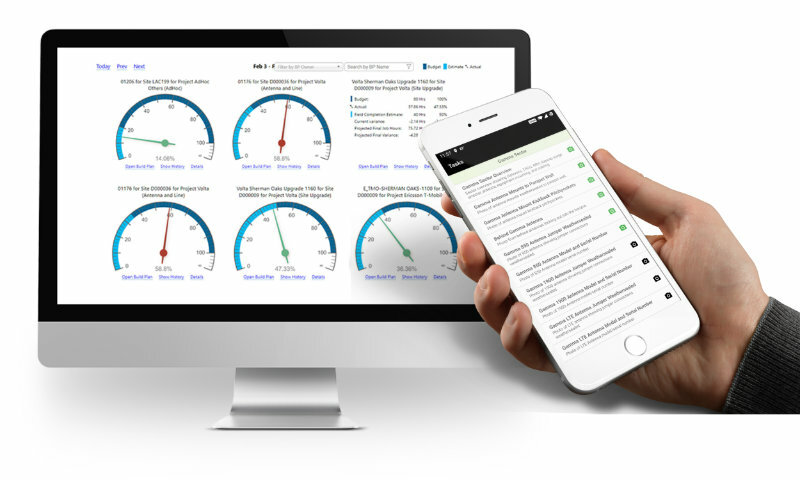
Eliminate Spreadsheets and Manual Data Entry
After an extended search, Darrin selected the Fieldclix software platform to help achieve his goal of measuring performance, establishing baselines, and embarking on a company-wide improvement program.
“It was important to find a software platform that captured operational and financial data in real-time to help make informed adjustments for active projects as well as ongoing improvements to my business, and Fieldclix fit the bill,” Darrin said. “With Fieldclix, our office and field teams have one platform to collaborate across dozens of active projects with instant access to the data, reports, and documents they need to perform their job.”
Pro tip #1
Capture both operational and financial data in one platform. It’s challenging to manage the entire project life cycle without an understanding of field progress, visibility into daily costs, and the status of your client and vendor financial transactions. Many software platforms only offer either operational or financial workflow support.
2Create Project Budgets and Track Costs Daily
Darrin’s project managers did a great job managing against projected milestones and dates but had limited visibility into the amount of money they were spending to achieve these goals. “We didn’t know which decisions and events were increasing our project costs,” he explained, “we focused on getting the job done, but often at the expense of our project margins.”
Darrin’s goal was to have his Project Managers focus on both the operational and financial aspects of their deployments, with an emphasis on project P&L (Profit and Loss).
“With Fieldclix, we get accurate daily updates on all our costs, including labor, materials, rentals, subcontractors, and field expenses,” Darrin said. His Project Managers now establish an operating budget for all cost items at the beginning of the project, which is reviewed and approved before the first dollar is spent.
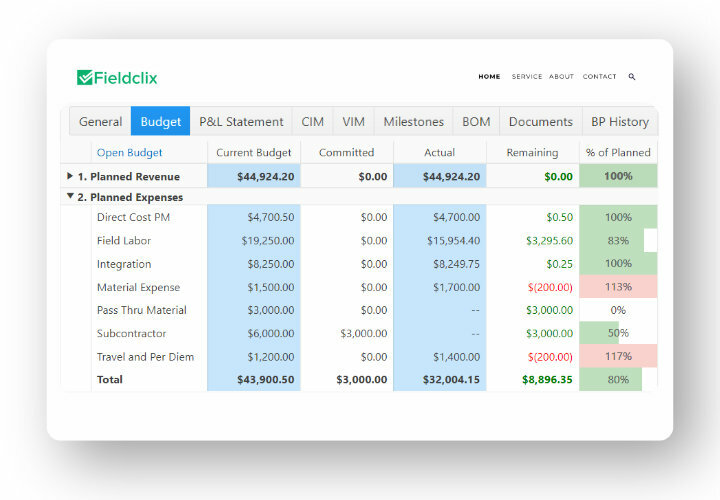
Create a Budget reflecting all project costs
Pro tip #2
After establishing your Project Revenue from the Client PO for a specific site build, remove pass-through costs, such as materials to create a “Service Revenue.” This is the amount of money you have on the table to play with as controllable spend. Remove the amount that reflects your desired project margin and consider removing an additional amount that reflects your estimated overhead costs (such as PM hours and equipment). The remaining budget is what the Project Manager has available to execute the site build.